What makes Cloudflare dns different from traditional dns.
Last updated on May 9, 2026
You’ve just bought a domain. Maybe it’s for a side project, maybe for your small business, or perhaps you just wanted to claim your own corner of the internet. And almost immediately, you hit a quiet fork in the road that almost nobody talks about: do you stick with the DNS that came with your domain or hosting, or do you switch to something like Cloudflare?

For a surprising number of people, DNS is invisible plumbing. You type a domain into a browser, the page loads, and that’s the end of the story. But the choice of DNS provider affects how fast your site loads, how well it stays online when bad actors come knocking, and how much control you have over traffic before it ever touches your server. I’ve bounced between the two camps for years, and I’ve learned that the difference is both simpler and more significant than most setup guides let on.
The Default Route: Traditional DNS from Registrars and Hosts

When you buy a domain from Namecheap, GoDaddy, Google Domains (back when it existed), or any other registrar, you get their built‑in DNS automatically. If you sign up for shared hosting with Hostinger, Bluehost, or any cPanel‑based provider, you often end up using their DNS servers as well. This is the “traditional” path, and its greatest asset is that it requires exactly zero thought. You don’t have to configure nameservers, you don’t need another account, and the integration is seamless: change your A record in the same control panel where you manage your domain renewal.
The interface is usually basic. You get the standard record types—A, AAAA, CNAME, MX, TXT—and a straightforward form to fill them in. Propagation times can be anywhere from a few minutes to a couple of hours, but once a record is in place, it generally works. For a personal blog, a small portfolio site, or a static page that gets a handful of daily visitors, this setup is perfectly adequate. In fact, I’d argue it’s the sensible choice if you value simplicity above all else. There’s something reassuring about keeping your domain management and DNS under one roof, with one login to remember, one bill to pay, and one support team to call.
The trade‑off, however, is that traditional DNS providers are not all created equal, and many of the default options come from companies whose primary business is selling domains or hosting accounts, not running a high‑performance DNS network. Resolution speed—the time it takes for a user’s device to look up your IP address—varies considerably. Many smaller DNS providers have limited points of presence, so visitors in Australia or Latin America may hit slower response times than someone in North America or Europe. And when it comes to security, the default protection is usually minimal. Your registrar may offer basic DNSSEC support, but it’s unlikely you’ll find built‑in DDoS mitigation, rate limiting, or any meaningful traffic filtering without paying extra.
I’ve watched small businesses on traditional DNS get knocked offline by a script‑kiddie attack that a more resilient provider would have absorbed without the owner ever noticing. I’ve also seen perfectly fine websites feel sluggish not because their server was slow, but because the DNS lookup tacked on an extra 150 milliseconds to every request. For many people, that’s still an acceptable trade‑off for utter simplicity.
The Cloudflare Switch: Moving Your DNS to a Global Network
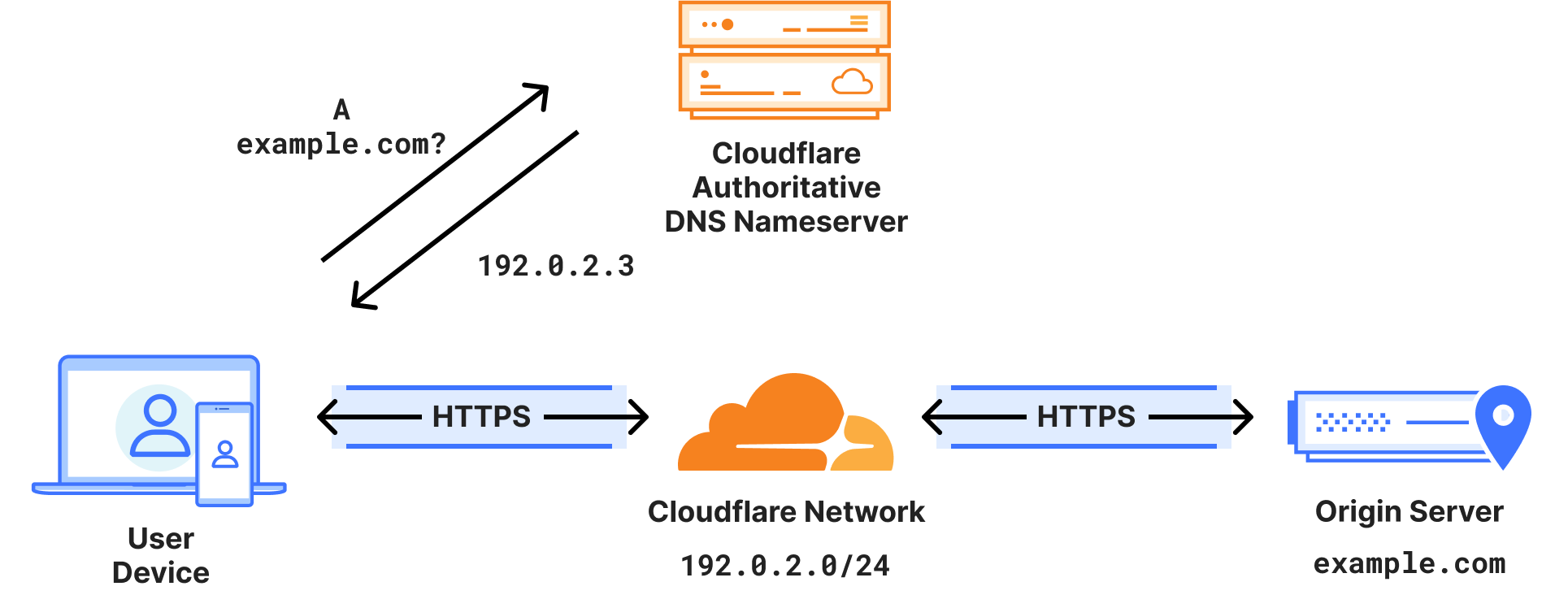
Cloudflare entered the scene over a decade ago offering something that felt audacious at the time: a free Content Delivery Network and DNS service that could make any website faster and safer. Since then, it’s grown into one of the largest networks on the internet, serving authoritative DNS for millions of domains and handling a staggering portion of global web traffic. Switching to Cloudflare means changing your domain’s nameservers to the ones they assign you, and once that’s done, you manage your DNS from the Cloudflare dashboard rather than from your registrar or hosting panel.
The immediate upgrade people talk about most is speed. Cloudflare operates an anycast network with data centers in over 300 cities. When someone types your domain, their query is answered by the Cloudflare data center closest to them, often in single‑digit milliseconds. For consistent, global performance, it’s hard to beat this setup without paying enterprise‑grade money. The difference is particularly noticeable for audiences spread across multiple continents.
Then there’s the security and CDN layer. Once your DNS is running through Cloudflare, you can flip a switch to proxy your traffic through their network. That means the visitor doesn’t connect directly to your origin server; they hit Cloudflare first, and Cloudflare serves cached content, absorbs malicious requests, and shields your server’s IP address from the public. This includes protection against volumetric DDoS attacks, bot filtering, and a web application firewall with a generous free ruleset. You also get free SSL certificates, automatic HTTPS rewrites, and a suite of analytics that show you exactly how much traffic you’re handling and where it’s coming from.
What I find genuinely remarkable is that Cloudflare’s free plan offers most of this without a time limit. No credit card, no trial countdown, no “upgrade to unlock DNS management.” The same infrastructure that powers enterprise customers is available to someone running a single‑page personal project. That’s a huge reason why millions of small sites have moved their DNS over.
The learning curve, however, is real. The Cloudflare dashboard is packed with options that can feel overwhelming if all you wanted was to set a couple of A records. I’ve seen beginners accidentally toggle “Under Attack Mode” and break their own site, or forget to disable proxying for an MX record and wonder why mail stopped flowing. The orange‑cloud vs. grey‑cloud toggle—proxy vs. DNS‑only—is the first thing you really need to internalize, but it can trip up someone who’s never used a reverse proxy before. There’s also the fact that by proxying traffic, Cloudflare effectively becomes a middleman with access to unencrypted data at the edge, which is the very definition of a man‑in‑the‑middle, albeit a trusted one. For most, the privacy policy and business model are acceptable; for others, especially those handling extremely sensitive data, the trade‑off merits careful thought.
Another subtle but significant point is that when you move DNS to Cloudflare, you’re putting a critical piece of your infrastructure in the hands of a third party. If Cloudflare has an outage—and it has happened, most notably the major incident in 2020—your DNS resolution goes down with it, and your site becomes unreachable regardless of how healthy your server is. To be fair, such outages are rare, and the company’s transparency reports are thorough, but the single‑point‑of‑failure risk is not zero.
Which One Feels Right in everyday experience.
In daily use, traditional DNS can feel like driving a basic manual car: you get in, it works, you don’t think about it much. If you rarely touch your records, there’s a strong argument for leaving things exactly as they are. It is remarkable how many successful businesses still host DNS at their domain registrar with zero issues. Not every website needs a global CDN or DDoS protection, and not every webmaster wants another dashboard to check.
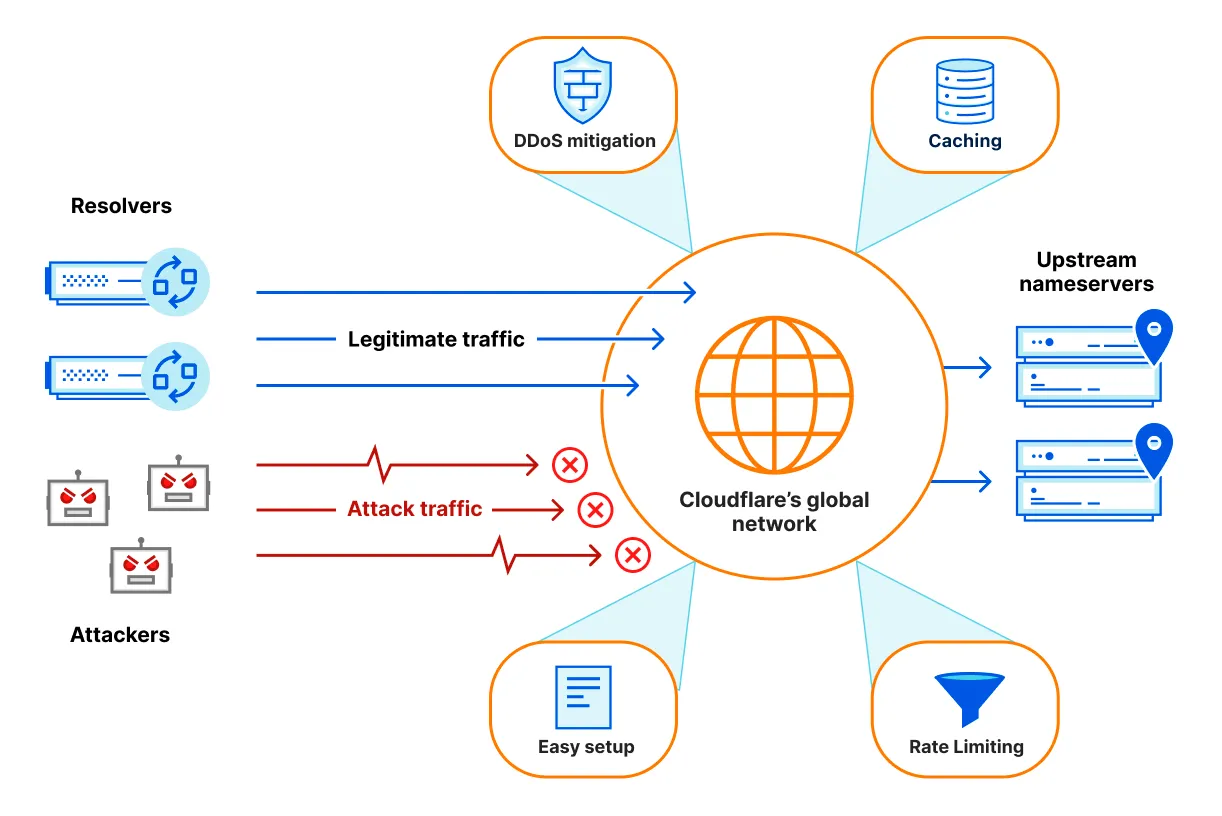
Cloudflare, by contrast, feels like stepping into a cockpit. You get instrumentation, graphs, filters, page rules, and a constant stream of feedback about your traffic. For someone who enjoys understanding what’s happening under the hood—or who actively needs to mitigate threats, optimize performance, and cache content at the edge—this control is empowering. Even on the free plan, you gain access to tools that would have cost serious money a decade ago: rate limiting for login pages, server‑side analytics, custom firewall rules, and image optimization via Polish.
One aspect that doesn’t get discussed enough is the domain registration and renewal experience. When you use traditional DNS, your registrar is also your DNS host, and renewing the domain feels like paying a single unified bill. If you move DNS to Cloudflare, you’re now managing that layer separately. Cloudflare does offer domain registration at wholesale cost, and their interface is refreshingly clean, but moving a domain there adds another migration step. Many choose to keep their domain with their original registrar and simply point nameservers to Cloudflare, which keeps the billing separated but clean.
Where the Industry Is Heading
In 2026, the line between “traditional DNS” and “Cloudflare‑like service” has started to blur. Many registrars now offer one‑click integration with CDN and security services. Namecheap has easy‑toggle CDN features; Porkbun has partnered with third‑party DNS providers; and even smaller hosting companies are deploying their own anycast infrastructure. At the same time, Cloudflare has expanded its free tier to include things like privacy‑first analytics and image resizing, raising the bar for what basic DNS management ought to include.
What these developments mean in practice is that the decision doesn’t have to be permanent. A domain owner can start on traditional DNS, migrate to Cloudflare when traffic picks up or a security concern arises, and never look back. I’ve migrated several domains between providers over the years, and while DNS changeovers require a careful sequence of exporting zone files and lowering TTLs, they’re entirely reversible in a matter of hours.
So, Which One Suits You
If your project is personal, low‑traffic, or exists purely as a digital placeholder, honest advice is to let your registrar handle the DNS. Don’t add complexity where none is needed. The built‑in tools are sufficient, and there’s no shame in using them.
If your site faces even a moderate number of visitors, represents a business, collects user data, or will be advertised publicly, moving to Cloudflare’s free plan is one of the highest‑impact, lowest‑cost technical improvements you can make. It speeds up every request, cushions you against common attacks, and hands you analytics that no shared‑hosting control panel will ever provide.
There is no universal right answer, and neither path is a mistake. The real victory is knowing that you have options—and that the barrier to professional‑grade DNS has never been lower.
Some data may be wrong. The information is based on general researches in internet. Weniba doesn't guarantee for correctness. Weniba doesn't take responsibility for wrong information. Only for educational purposes.